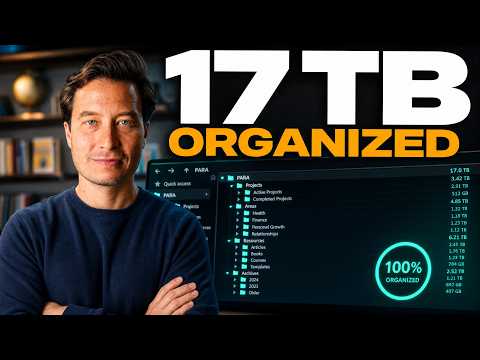
What can AI do with file system access? The short answer: almost everything you used to do manually. We're past the era of dragging files into a chat window and waiting for an upload. When your AI shares your file system — your actual folders, your real documents — it stops being a chatbot and starts being a true collaborator. It can read files, edit them, create new ones, reorganize entire projects, and even synthesize insights across years of your personal history. Here are seven real-world tasks that prove just how different this changes everything.
What Can AI Actually Do With File System Access?
The old workflow was painful: find the file, drag it in, wait for upload, get a response, manually apply the suggestion yourself. File system access collapses all of that. The AI works inside your workspace. It reads your files, writes new ones, renames and reorganizes folders, and does it all without you lifting a finger beyond giving it a direction.
 01:15
Claude reading five PDFs in parallel and generating a full research dossier
Watch at 01:15 →
01:15
Claude reading five PDFs in parallel and generating a full research dossier
Watch at 01:15 →
The seven tasks below aren't theoretical. These are specific, real workflows that become possible the moment your AI has access to your local — or synced — file system.
How to Use AI to Read and Summarize Hundreds of Documents
The first unlock is bulk document reading. Instead of feeding an AI one PDF at a time, you can point it at an entire folder and say: read and summarize all the PDFs here, find the key ideas, and surface connections to my current projects.
In practice, this means handing over five research PDFs and getting back a 2,000–3,000 word research dossier in a few minutes. The AI reads all the documents in parallel, performs cross-paper synthesis to identify themes that span multiple studies, and even flags which insights are most relevant to whatever you're working on right now.
05:30
The AI editing an existing markdown file in place — no new file created
Watch at 05:30 →
The output isn't just a summary dump either. It creates a new markdown document, organized and structured, ready to use. This is the difference between working with one document at a time and working with entire collections at once. It's a completely different level of leverage.
Can AI Directly Edit Files on Your Computer?
Yes — and this is one of the most significant shifts. AI with file system access doesn't just tell you what to change. It makes the change. You can ask it to revise an existing document — say, rewriting a beginner's guide to be more accessible — and it edits the actual file in place. No new file created. No copy-paste required. The original document is updated.
This distinction matters enormously. For years, AI has been excellent at generating advice. The bottleneck was always execution — you still had to go do the work. That bottleneck is gone. The AI can now execute the work itself.
09:45
A chaotic project folder reorganized into a clean hierarchy by the AI
Watch at 09:45 →
How to Get AI to Edit Your Book Manuscript With Tracked Changes
For writers, this capability is a genuine game-changer. Imagine pointing the AI at a 60,000–70,000 word manuscript and asking it to focus on Chapter 1, then create a brand new document with all its revision suggestions embedded as tracked changes — exactly like a human editor would.
That's not a hypothetical. That's a real workflow that takes about 10–12 minutes and produces a Word document you can open and review comment by comment. Each tracked change is labeled clearly, the reasoning is explained inline, and you remain in full control of what to accept or reject. It's like having a developmental editor on call who has actually read every word of your draft.
How Can AI Automatically Organize Your Entire Folder?
Every big project ends the same way: a chaotic dump of logos, spreadsheets, Google Docs exports, prompt libraries, and random screenshots all sitting in one flat folder. Cleaning it up manually is tedious and easy to keep putting off.
15:20
18 years of health documents synthesized into a two-chapter health narrative and roadmap
Watch at 15:20 →
With file system access, you can hand that mess to an AI and say: organize this into logical subfolders, name the folders clearly, and rename any files that aren't descriptive. Within minutes, a disordered pile becomes a clean hierarchy. Subfolders are created. Files are renamed to reflect their actual contents. And the AI flags anything suspicious — like duplicate files — for your review.
This isn't just a productivity trick. It's a different model for how we think about AI assistance. Rather than a task-executor following narrow instructions, the AI is acting as a workspace designer — creating structure, reshaping it, and evolving it as your work changes.
How Does AI Help You Track Progress Across Years of Work?
One of the strangest limitations of AI has always been its lack of memory. It has no sense of time, no sense of your personal history. But your file system does. Your folders often go back years — sometimes decades.
By giving the AI access to a folder spanning years of documents, you give it a timeline. Point it at a health folder containing 18 years of medical records, blood work, lab results, and notes, and ask it to analyze how your health has changed — then build a forward-looking roadmap. The result is something most doctors simply don't have time to produce: a longitudinal, deeply personalized health narrative with specific, actionable priorities.
The same principle applies to any area of life. A folder of old project files becomes a record of how your thinking has evolved. A notes archive becomes evidence of your intellectual development. Your file system, it turns out, is already a rich personal history — the AI just finally has the ability to read it.
Can AI Build a Health Roadmap From Your Old Medical Files?
To make this concrete: 18 years of health documents, read and synthesized in about 8–9 minutes. The output identified two distinct chapters of health history, flagged a meaningful deterioration in recent blood work metrics, and produced a forward-looking roadmap organized around sleep, energy, and longevity.
No doctor has the time to do that level of historical synthesis. The AI does. And while it doesn't replace medical advice, it gives you something invaluable: a prepared, informed starting point for every conversation with your actual healthcare team.
How to Use AI to Survey Your Notes Vault for a Book Idea
Tools like Obsidian store notes in plain markdown files locally — which makes them perfectly readable by an AI with file system access. The question do I have enough material to write a book on this topic? used to require hours of manual review. Now it takes two or three minutes.
Pointing an AI at a vault of 1,500+ notes and asking whether there's enough rich material for a book on the relationship between joy and high performance produces a nuanced answer: yes, and here's where the material is strongest, here's where the gaps are, and here's the synthesis work that still needs to happen. That's not flattery — it's a genuine editorial assessment, and it can redirect your next six months of creative work.
What Is Cross-Folder Synthesis and Why Does It Matter?
The most advanced capability unlocked by file system access is cross-folder synthesis. This is where things get genuinely exciting. Instead of working within a single project folder, you can give the AI access to multiple folders simultaneously — a project folder, a marketing area folder, and a content archive — and ask it to synthesize insights across all three.
For example: take everything in an AI course project folder, combine it with years of marketing experiments and content data, and generate a launch strategy for the next cohort. The result surfaces things you'd never connect manually: which buyer psychology modes you need to speak to simultaneously, which concepts are resonating most, which referral strategies had the highest redemption rates historically.
This is the leap from assistant to strategic collaborator. When AI can hold multiple entire collections of documents in mind at once and find connections between them, it stops helping you execute tasks and starts helping you see your work differently.
The Bigger Picture: What This Actually Changes
File system access isn't a feature update. It's a fundamental shift in the relationship between you and your AI tools. The drag-and-drop era is over. The era of AI as a true workspace collaborator — one that reads your history, edits your work, organizes your projects, and synthesizes insights across your entire knowledge base — has arrived.
The seven tasks above are just the beginning. The real opportunity is rethinking what work you should be doing yourself versus what can now be delegated to an AI that actually lives inside your file system alongside you.