The best free open source AI image editing tools available right now include doodle-to-image generators, ControlNet for prompt-based style editing, and pix2pix for swapping objects in both photos and videos — and every single one of them is available to play with for free on Hugging Face today. We have come an incredibly long way from barely generating blurry 25x25 pixel faces to producing highly detailed, photorealistic imagery of virtually anything you can imagine, and the pace of improvement shows absolutely no signs of slowing down.
In this breakdown, we are going to walk through each of these tools, how they work, what they are best suited for, and — just as importantly — how you can start protecting your own images from being manipulated by this same technology.
What Are the Best Free AI Image Editing Tools Right Now?
Right now, the most impressive and accessible open source AI image and video editing applications fall into a few clear categories: generative editing from rough sketches, style and color transformation via ControlNet, and full object replacement with pix2pix. All of these tools leverage diffusion models and attention mechanisms that allow the neural network to understand not just what is in an image, but which regions of that image correspond to specific words or concepts in a text prompt. That breakthrough — pioneered in part by research like Google's Prompt-to-Prompt paper — is what makes editing feel intuitive rather than chaotic.
The best part? You do not need a powerful local machine to try most of these. Hugging Face hosts free demos for all of them, though you may need to wait in a queue or optionally spin up a hosted GPU if you want faster results.
How Do You Turn a Doodle Into a Real Image With AI?
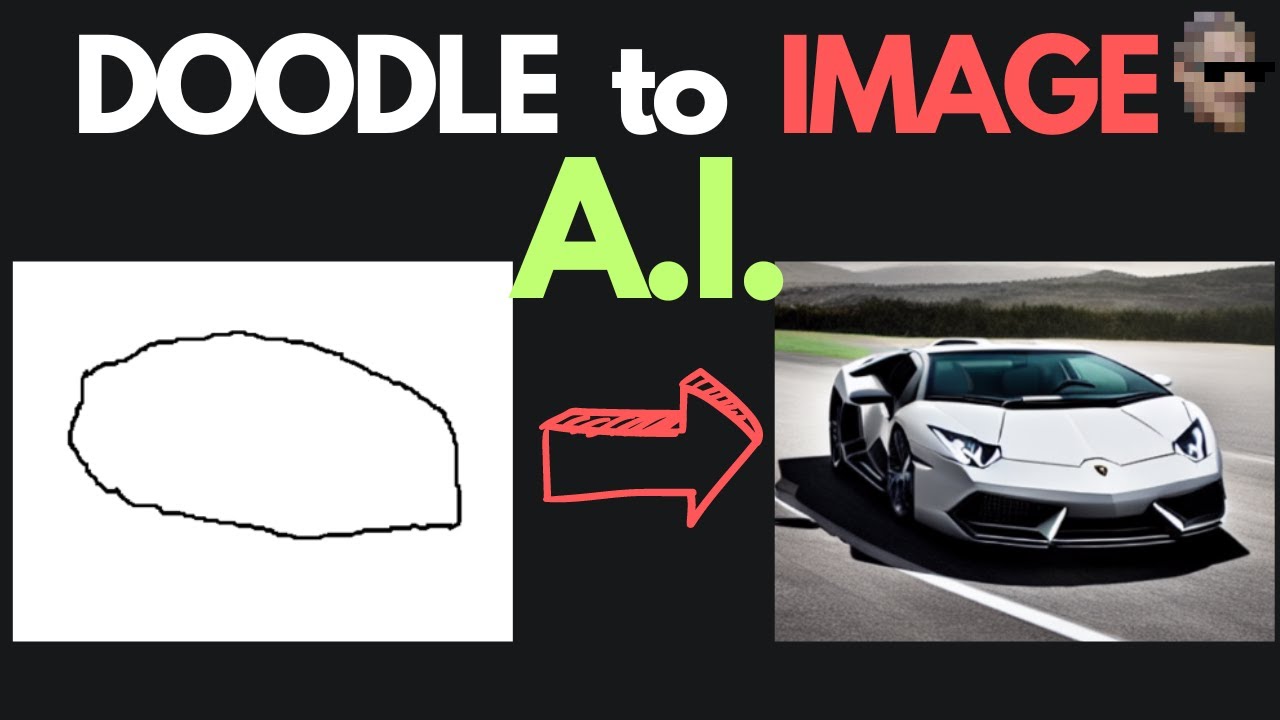
One of the most fun and frankly mind-bending applications available right now is doodle-to-image generation. The concept is exactly what it sounds like: you draw a rough sketch, and the AI generates a fully detailed, photorealistic (or stylized) image based on your doodle. Whether your masterpiece looks like an R2D2, a Lamborghini, or a Porsche 911 parked next to a tree, the network can interpret it and produce something genuinely impressive.
The key thing to understand about how this works is that the model is primarily reading the edges and exterior shapes of your doodle, not the interior detail. Think of it less like painting and more like tracing an outline that the AI then fills in intelligently. This means:
- Stick figures will not work well — the exterior silhouette needs to resemble the real object
- You should decrease the canvas brush size before drawing so your lines are precise enough to define a clear shape
- You can absolutely include multiple objects in a single doodle and the model will handle them together
This tool is free to use right now via Hugging Face, and honestly, even with questionable artistic skills, the results can be surprisingly good. It is one of those tools you just have to try yourself to fully appreciate.
How Does ControlNet Let You Edit Images With a Prompt?
ControlNet takes things a step further by allowing you to take a pre-existing image — whether AI-generated or a real photograph — and make meaningful edits to it using nothing more than a text prompt. The workflow involves running the image through an edge detection filter first, which extracts the structural skeleton of the scene. From there, you supply a text prompt describing the change you want, and the model regenerates the image while preserving the underlying structure.
This approach is particularly effective for changing colors, styles, lighting, and visual aesthetics of an image. For example, you could take a photo of someone in a plain jacket and prompt the model to give them bleach blonde hair and aviator sunglasses, and the result will respect the original composition while making the transformation. It is not perfect for every use case, and results can vary when you are trying to replace entire objects rather than just modifying style — but for stylistic transformations, ControlNet is hard to beat.
The underlying reason this works at all comes back to attention mechanisms in the neural network. The model has learned to associate specific regions of an image with specific tokens in a text prompt, meaning it understands that the word "hair" in a prompt corresponds to a particular area of the image. That connection is what makes targeted editing possible at all.
How Do You Use Pix2Pix to Swap Objects in Photos and Videos?
When you want to go beyond style changes and actually replace objects entirely, pix2pix tends to deliver more reliable results than ControlNet alone. With pix2pix, you can take a photo of, say, a dog, supply a prompt like "replace with a bear," and the model will do exactly that — swapping out the subject while keeping the rest of the scene largely intact.
What makes pix2pix especially exciting is that it works on video as well as photos. Since video is just a sequence of image frames, you can run the same editing pipeline across an entire video clip. Right now, the video editing results are still fairly rough — there is noticeable flickering and inconsistency between frames, and the overall aesthetic has an unmistakably artificial fingerprint to it. But this feels less like a broken product and more like an early glimpse at something that is going to be extraordinarily powerful very soon.
\p>If you want to process videos longer than five seconds, you have a couple of options:- Duplicate the Hugging Face Space and run it on a hosted GPU
- Download the app code locally, edit the
app.pyfile to lift the length restriction, and run it on your own hardware
The pix2pix demo is available for free on Hugging Face right now, just like the doodle-to-image tool.
How Can You Protect Your Photos From AI Manipulation?
With tools this powerful becoming freely and widely available, the obvious and urgent question becomes: how do you protect your own images from being edited or manipulated by AI without your consent? This is one of the most important emerging problems in the space, and right now there is already at least one meaningful attempt at a solution.
PhotoGuard is a tool that applies an imperceptible adversarial filter to your image before you share it publicly. The filter is specifically designed to confuse and disrupt AI generative models, making it significantly harder for them to cleanly edit or manipulate the protected image. You can think of it a bit like a watermark, except the disruption happens at the model-input level rather than visually on top of the photo.
What Is PhotoGuard and Does It Actually Work?
PhotoGuard is currently available to try on Hugging Face and represents a genuine proof-of-concept for AI-based image protection. It does introduce a small degree of quality degradation to the protected image, which is a real trade-off — but for sensitive photos or videos, that trade-off is likely worth it for most people.
There are some important caveats to understand about how robust this protection actually is:
- A sufficiently motivated actor could train a new generative model specifically on PhotoGuard-processed examples, effectively teaching the model to work around the protection
- This means image protection technology will likely become an ongoing arms race — similar to the relationship between malware and antivirus software, or firewalls and cyberattacks
- Future protection algorithms may not even need to be neural networks — a well-designed lightweight algorithm that targets the specific mechanisms of diffusion models could potentially be more robust and less intrusive
Despite these limitations, PhotoGuard is a meaningful step forward and points toward what could become an entire industry of companies focused solely on protecting people's shared media online. If this area of research interests you, it is a genuinely wide-open field with a lot of unsolved problems.
What Does the Future of AI Video Generation Look Like?
If the current state of AI image and video editing is already this impressive, the near-term future is almost difficult to comprehend. Frame-to-frame consistency in video editing is still the biggest unsolved challenge — the flickering and inconsistency that makes current AI video editing feel rough will almost certainly be solved within the next year or two, at which point the line between real and AI-generated footage is going to become extraordinarily blurry.
Beyond editing existing footage, prompt-to-video generation — generating entirely new video from a text description alone — is the next major frontier. And beyond that, prompt-to-3D scene generation for creating entire environments and objects from text is another area where significant progress is expected in 2023 and beyond.
The rate of improvement across all of these areas is genuinely staggering. What feels like a novelty or an art project today is going to be a production-grade tool tomorrow. If you are not already playing with these open source tools, now is exactly the right time to start — everything listed here is free, accessible, and already capable of producing results that would have seemed impossible just a couple of years ago.